10 Blog Ideas For Your Weight Loss Center

10 Blog Ideas for your weight loss center

Weight loss is never easy no matter who you are. When you run a professional medical weight loss center it pays to have a blog on your website with helpful articles about weight loss to guide people along the difficult road. This means articles about diet, recipes, exercise, and techniques that make losing weight easier. Blogs provide patients with useful information that promotes your weight loss center and serves as good healthcare marketing.

Write Profiles of Successful Patients That Lost Weight

Blog or write detailing the success of men, women and children who have lost weight on your program. Tell about how they did it, what they ate, how long it took, and the frustrations they faced. This will give other patients an idea of how well your program works. Provide some positive points about your weight loss program and how it caters to different types of individuals.

Review Some of the Latest Diets Trends

Review some of the latest diet trends. Pointing out the difference between a healthy diet is a fad diet can teach clients what to avoid. An article written by a doctor will earn the respect of patients. Keep patients on the right track by providing up to date information and findings about healthy diets rather than fruitless fad diets.

Overview Tools that Help With Weight Loss

Write blogs about the proper way to keep a food diary for those that are counting calories. Many people try to track their dietary habits and progress, but simply don't know how to keep it up. How do you plan and write a menu for the week? These are topics your weight loss patients will want to know about. Review some of the electronic applications they have that will keep track of food calories, carbs and weight loss.

Provide blogs with healthy recipes

Write blogs with healthy recipes for breakfast, lunch and dinner. Feature a new recipe every week. Invite patients to share recipes which you will feature on the blog. This gives them asense of participation. Those losing weight are always looking for easy new healthy recipes. Focus on salads, side dishes, soups, sandwiches, and main entrees.

Write a Blog about Patients That Have Had Weight Loss Surgery

Do you offer weight loss surgery? Write about successful patients and how it helped them loss weight. Chronicle their daily life after the surgery and the results. Provide details about the surgery and the pros and cons of the procedure. This opens your website traffic to a large audience of people considering various popular weight loss surgeries.

Feature A Variety of Recipes for Patients

Focus on writing a blog that addresses a variety of patient’s needs. Provide some gluten free recipes, recipes for diabetics, and those on the Paleo diet. Many patients that are overweight suffer from different medical conditions which require recipes for special diets. Cater to the many different types of patient you have. This means featuring a variety of different recipes.

Blogs about Different Weight Loss Surgery Procedures

Often patients want to know the pros and cons of different weight loss surgery. Blog about the different types and the pros and cons. Help them decide if they are a good candidate for the procedure. Not only do patients want to know about others experiences with weight loss surgery, but they want to know how it directly will affect them. Be the resource that they rely on.

Blog about Different Types of Exercise and Weight Loss

Focus on a blog that features different types of exercise and its contribution to weight loss. Most patients are searching for a form of exercise that is just right for them. Talk about walking, swimming, running, biking, and jogging. Provide information on exercising at the gym or health club or joining an association that provides a gym or pool. Find fun ways to sneak in work outs and share with your readers.

Blog About How to Eat Out on Diet

Most Americans like to eat out when dieting. It is a social activity and enjoyable. It is hard to diet and eat out without overdoing your caloric intake. Give your clients tips on what to eat, what to avoid, and how to fill up without consuming too many calories. You might suggest dining out less and picking restaurants that serve food that fits into their weight loss plan. Use dining out as a reward for sticking with their weight loss plan.

Write about Weight Loss Medications and How They Helped Your Patients

Write an article about weight loss medications and how they helped some of your patients lose weight. Many people are researching on how to lose weight and a major topic of conversation is weight loss medicine. Write about the different medications, their benefits, and side effects. Provide patients with enough information to make a decision whether to use them.

Blogs that provide useful information are great healthcare social media tools. This is one form of medical marketing that patients absolutely love. Good content is a way to connect with your patients and their families while also increasing your SEO. Creating quality content on your website will continuously keep you climbing the rankings online. Keep it up!

By Joan Russell

How To Get The Most Out of Your Healthcare Practice's LinkedIn

LinkedIn is often used as a medium for people to discover job opportunities, but you can also use LinkedIn for healthcare marketing. Considering that around 59 percent of people roam the internet in search of medical data, it is important to take advantage of LinkedIn for your healthcare company’s advantage. One of the ways to utilize LinkedIn is to learn how to setup the network’s tools and features to your benefit. Here are a few tips:

1)    Create a LinkedIn business page.

This page is great for healthcare marketing. It will guide your business on the track to marketing to potential employees, business professionals, and clients that will help to develop future connections and create a reputation. In addition, your corporation’s page will display your business services, objectives, and company philosophy.

2)    Use Advanced People Search.

LinkedIn’s Advanced search will hone in on the specific types of people that you believe would assist in acquainting people to your company. When you are performing your social media medical marketing campaign, you can use your customer persona to help illuminate your social outreach.

3)    Use Ad Space.

This medium is great for enhancing your healthcare social media advertising. With Ad Space, you will have the ability to track your visitors, leads, and bump up your content using precise keywords and phrases. This helps immensely because people will often search generally, but using specific ads can target customers, which helps your healthcare company obtain comprehensive information.

When your healthcare company takes advantage of LinkedIn social media marketing, the benefits can range from augmenting patient care to acquiring media coverage, while also drawing in new patients and staff. LinkedIn is a wonderful tool to help your healthcare company to increase in its growth. For more information on how LinkedIn can help your company, check out LinkedIn strategies.

By Preston Copeland

5 Reasons Why Your Physicians Practice Needs Facebook

5 reasons your physicians practice needs facebook

Social media is a great way for your doctor’s office to utilize healthcare marketing. Facebook is an extremely popular social media platform that many businesses use to connect with customers. By creating a simple Facebook page for your Physician’s office you open the door to offering healthcare education, posting news, office updates, and reaching new customers. These are just a few of the many reasons why you need to create a Facebook page now!

Connect With Patients and Get Feedback

Facebook enables your practice to connect with patients and hear their concerns, input, and feedback. If problems arise you can address it directly by using this platform. Unless your physician is a magical center, you might run into a negative review on Facebook at some point. In the case that a negative review arises it's better if you are able to read it and respond directly to resolve the issue. You can turn that unhappy patient into a happy patient with a thoughtful response! This platform also helps you find out what health concerns patients have so you can add valuable online content that addresses their concerns. Overall, it is a useful tool to get to know your patients better and meet their needs.

It Improves Patient Education

Creating a business Facebook pages allows your practice the chance to improve patient education. This can be done through sharing informative articles or blog content that is posted on your website. This content can be an impactful way to inform patients about new procedures or advice on how to care for themselves. When it is written by a physician that they know, they are more likely to read and respect the advice. It gives your staff the opportunity to share other medical articles or websites with patients to keep them aware of changes in the medical field. This is an excellent medical marketing tool.

Promotes Physician Education and Networking

Networking, networking, networking! Your practice can connect with other doctors and observe how similar types of specialties are marketing to enhance your overall knowledge. Inspiration is everywhere and this is key to making your marketing strategy a great one! Facebook offers your practice the chance to interact with other physicians online and join groups or organizations that address medical issues. Learning from others helps you keep on top of your practice's marketing and connect with other physicians. Networking can be a way for others to learn about your practice and gain new patients.

Social Media Supports Your Patient Community

A chronic physical illness can be very isolating for patients. Facebook has many online support groups for cancer and other chronic illness that patients suffer from. If you have a Facebook page, you can provide a list of support groups that address your specialty. This gives patients a chance to connect with others suffering from the same disease. On your Facebook page you can start your own support group where patients can ask questions and get support from you and other patients. This opportunity can greatly affect your practice's ability to connect with patients in a way that you might not have been able to do so before. Giving patients a sense of control over their illness is priceless.

Extend the Reach of Your Practice and Get New Patients

A Facebook page is a great way to promote medical marketing. Those patients that you already have will often tell their friends about your practice. If others see someone they know commenting on your Facebook page, you increase your chances of connecting with a wider range of patients. Many people like to go to a doctor that someone they know uses. Social media promotes your physician's office, and it's free! When you live in a large city you can extend your marketing range to cities and towns nearby. This will bring in more patients for your office in no time!

By creating a Facebook page for your physician’s practice you can post patient success stories, share videos and promote special events. If you a holding a fundraiser or special event this is the best place to post it. Often patients will tell others about your office which will increase the amount of new patients for your practice. Another point is you can control your reputation through Facebook by addressing patient concerns. 

By Joan Russell

Decoding Google Analytics on Your Own: Part 1

Decoding google analytics on your own: Part 1

Google Analytics may appear to be a jumble of data, graphs, and numbers if you aren’t familiar with the program and how to break it down. If you try to take in all the information at once, of course you’re going to get a little lost! Fortunately, it is actually pretty easy to understand and grab information from once you learn how to navigate the program. With a few helpful tips you will be able to decode your analytics in no time. So, here’s a beginner’s guide to decoding your business’s Google Analytics.

Decoding Google Analytics on Your Own: Part 1

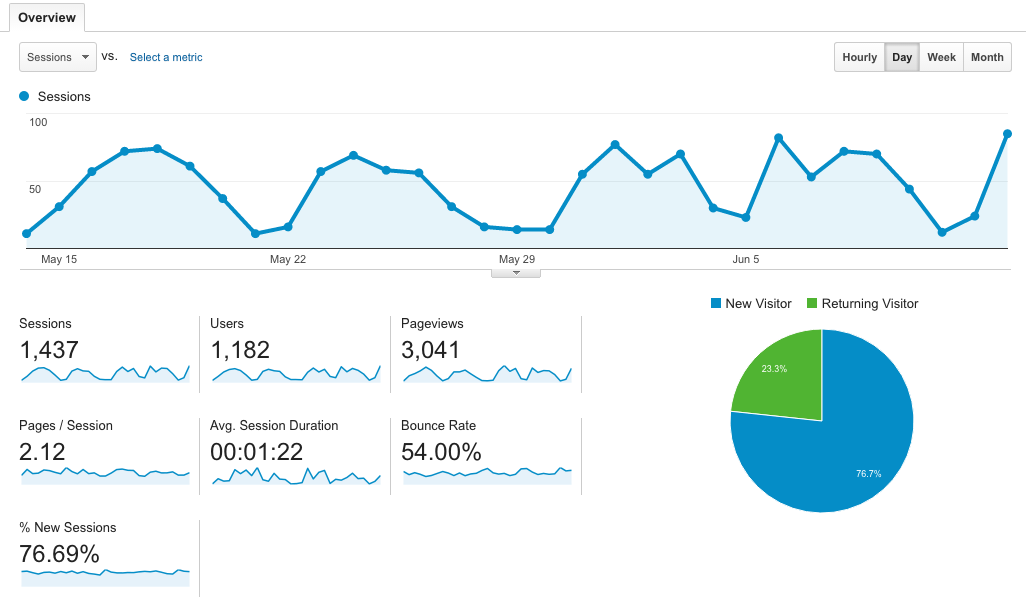
On the left side of the screen, there is a list of tabs. Simply click ‘Audience’ and then ‘Overview’. This section is responsible for relaying how many people are visiting your site and how long they’re staying. You should see something similar to the picture above

Decoding Google Analytics on Your Own: Part 1

So, what does all of this information mean? Here’s a quick breakdown:

Sessions:

Sessions simply means a period of time a user spent on your page. If I visit your page, my time on your website would be counted as 1 session. Google’s tracker resets a session after 30 minutes of inactivity. So, I can visit your page 5 different times in one day and account for 5 sessions.

Users:

You may be curious why the number of users is lower than the number of sessions. Users are only counted once—even if they visit your page numerous times on different days and account for multiple sessions. So, 1 user can give you 20 sessions.

Pageviews:

Most websites have more than a single page. So, if I visit your website and click your homepage, then your about us page, then your contact page, that would count as 3 page views. Just as a sum up—I would be counted as 1 user, 1 session, and 3 page views for this visit. It’s making sense, right?

Pages/Sessions:

This one is super simple. This is the average number of pages a user viewed per session on your website. According to the image above, users typically visited 2.12 pages while on their website.

Avg. Session Duration:

Again, super straight forward. The average time users spent on their website was 1 minute and 22 seconds.

Bounce Rate:

A bounce rate is the percent of users that only visited one page on your website and didn’t interact with anything. So, if I visited your website and immediately left without clicking another page, that would be considered a bounce.

% of New Sessions:

This is the estimated percentage of new users on your website. Pretty straight forward.

Decoding Google Analytics on Your Own: Part 1

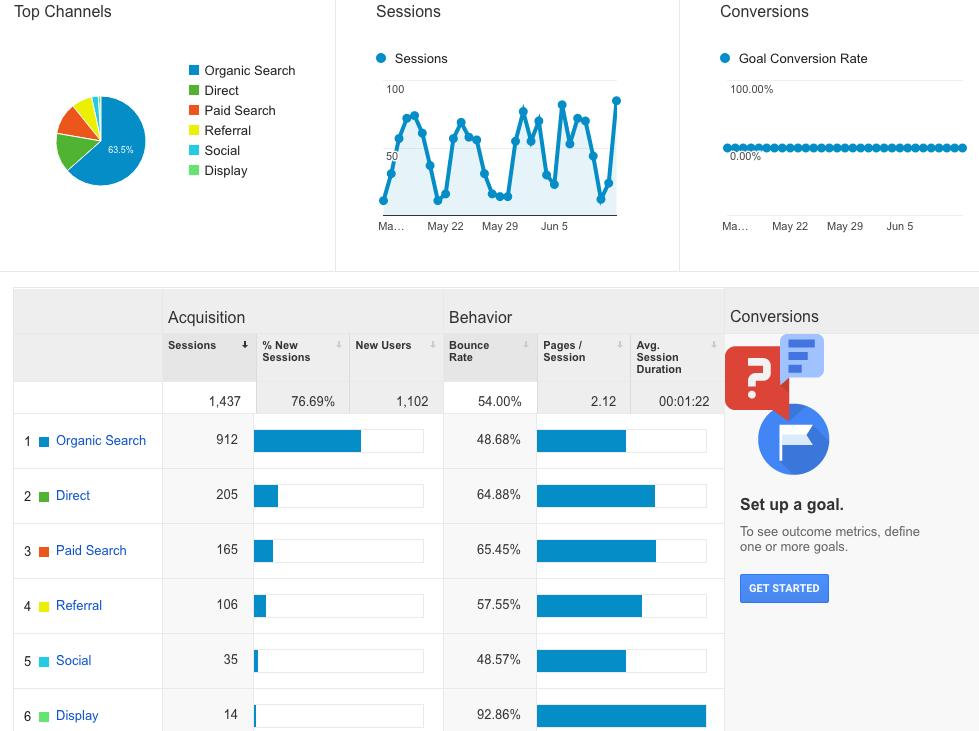
Moving along, on the left side of the page click ‘Acquisition’ and then ‘Overview’. This section allows you to determine how people are getting to your website. You should see something similar to the image below.

Decoding Google Analytics on Your Own: Part 1

Organic Search:

This is the number of times someone found your page from searching relevant terms online. For example, if I googled ‘summer clothes’ and I clicked Forever21’s website from the results page, that would count as an organic search.

Direct:

Super simple, this is the number of times someone typed in your url and went directly to your page.

Paid Search:

This is the number of times a user clicked your website url from one of your paid efforts. For example, if you had a paid google ad and someone clicked it—that would count under paid search.

Referral:

This is the number of times a user clicked a link to your website from another source. For example, if I was reading a blog about summer clothes on a fashion blogger’s page and clicked a link to Forever21 within the blog—that would count as a referral.

Social:

This is the number of times someone went to your website from social media. For example, if someone clicked your website link from a post on your Facebook—that would count as a social media point.

Take it step by step when deciphering your Google Analytics in order to avoid overwhelming yourself. This online analytics tool has endless data that you can discover, but as for now you’re on your way to decoding the beginning steps of your Google Analytics. It’s important to understand how many people are visiting your site, how long they’re staying, and where they’re coming from. Use this new information to alter your marketing strategy accordingly!

How to Run Your Healthcare Practice's Pinterest Account!

How to Run Your Healthcare Practice's Pinterest Account

According to VB, there are over 100 million users on Pinterest. That is a huge pool of potential customers that you’re missing out on if your business isn’t active on this platform. You may have heard numerous people say they have a board for their future wedding, house inspiration, DIY crafts, etc. So, what does this have to do with healthcare? Trust us, there’s endless potential for your healthcare practice on Pinterest and we’re here to show you the light. If your healthcare practice has a Pinterest, but doesn’t know how to start using it, then you’re in luck. Here’s 4 steps to take after you’ve created a Pinterest for your healthcare practice.

1. Increase brand awareness.

Pinterest allows each user to customize their own page, which your practice can capitalize on. You can add your business name, logo, description explaining your services, and links to your other social media platforms. Your boards should be healthcare related, so any user browsing through your pins will be there because they are researching healthcare related information. This is the perfect time to capitalize on increasing your brand awareness and make sure potential customers know who you are. While this platform is used leisurely by users, that doesn’t mean you can’t snag new patients.

2. Gain a healthcare following.

This is key. You want to follow and pin items from users that are healthcare related. Whether they simply have a board about healthier living, healthcare trivia, etc., target these people. This enhances your likelihood of them following your account back. For example, if a pool company followed your account, would you be likely to follow to them back? Of course not, you’re running a healthcare practice. It’s important to create a target audience and find people that fit the bill. Don’t waste your efforts following people that most likely will ignore your follow. You need to show them that your account falls within their interests!

3. Create boards that users will want to follow.

While it’s important to have a board for your business and pinning relevant articles, your services, etc., don’t focus primarily on yourself. You just need to be a resource for your followers. Get creative and come up with boards that are fun, interesting, and engaging for your followers. Here’s a few examples to get your mind going: “Fitness Routines”, “Healthy Bones” “Parents Guide: Keeping Your Kid Healthy” “Healthcare Trivia” “Healthcare Memes”. Depending on your practice, you can target your boards a little further. Just make sure it’s fun and something that people would want to follow.

4. Boost engagement through contests.

What’s the point of having a Pinterest if no one is engaging with your pins? Pinterest is the perfect place to host a photo contest considering it’s a platform full of photos. You can decide how you want to run your photo contest, (Example: most creative photo with our business logo on it will win X prize) but just make sure you have enough of a following to run this contest. Encourage your patients in person to participate and get the ball rolling if organically growing your followers hasn't panned out in a big way yet. By boosting engagement, your page will see an increase in activity and followers which means a higher chance of potential patients.

Pinterest has endless potential for your healthcare practice, but make sure you’re starting with the basics and don’t get too far ahead of yourself. Following these first steps will make sure your account is in tip-top shape. Every business needs a hearty following, active engagement from followers, and great content. Start with the basics and see how far you’ll go!