5 Reasons Why Your Physicians Practice Needs Facebook

5 reasons your physicians practice needs facebook

Social media is a great way for your doctor’s office to utilize healthcare marketing. Facebook is an extremely popular social media platform that many businesses use to connect with customers. By creating a simple Facebook page for your Physician’s office you open the door to offering healthcare education, posting news, office updates, and reaching new customers. These are just a few of the many reasons why you need to create a Facebook page now!

Connect With Patients and Get Feedback

Facebook enables your practice to connect with patients and hear their concerns, input, and feedback. If problems arise you can address it directly by using this platform. Unless your physician is a magical center, you might run into a negative review on Facebook at some point. In the case that a negative review arises it's better if you are able to read it and respond directly to resolve the issue. You can turn that unhappy patient into a happy patient with a thoughtful response! This platform also helps you find out what health concerns patients have so you can add valuable online content that addresses their concerns. Overall, it is a useful tool to get to know your patients better and meet their needs.

It Improves Patient Education

Creating a business Facebook pages allows your practice the chance to improve patient education. This can be done through sharing informative articles or blog content that is posted on your website. This content can be an impactful way to inform patients about new procedures or advice on how to care for themselves. When it is written by a physician that they know, they are more likely to read and respect the advice. It gives your staff the opportunity to share other medical articles or websites with patients to keep them aware of changes in the medical field. This is an excellent medical marketing tool.

Promotes Physician Education and Networking

Networking, networking, networking! Your practice can connect with other doctors and observe how similar types of specialties are marketing to enhance your overall knowledge. Inspiration is everywhere and this is key to making your marketing strategy a great one! Facebook offers your practice the chance to interact with other physicians online and join groups or organizations that address medical issues. Learning from others helps you keep on top of your practice's marketing and connect with other physicians. Networking can be a way for others to learn about your practice and gain new patients.

Social Media Supports Your Patient Community

A chronic physical illness can be very isolating for patients. Facebook has many online support groups for cancer and other chronic illness that patients suffer from. If you have a Facebook page, you can provide a list of support groups that address your specialty. This gives patients a chance to connect with others suffering from the same disease. On your Facebook page you can start your own support group where patients can ask questions and get support from you and other patients. This opportunity can greatly affect your practice's ability to connect with patients in a way that you might not have been able to do so before. Giving patients a sense of control over their illness is priceless.

Extend the Reach of Your Practice and Get New Patients

A Facebook page is a great way to promote medical marketing. Those patients that you already have will often tell their friends about your practice. If others see someone they know commenting on your Facebook page, you increase your chances of connecting with a wider range of patients. Many people like to go to a doctor that someone they know uses. Social media promotes your physician's office, and it's free! When you live in a large city you can extend your marketing range to cities and towns nearby. This will bring in more patients for your office in no time!

By creating a Facebook page for your physician’s practice you can post patient success stories, share videos and promote special events. If you a holding a fundraiser or special event this is the best place to post it. Often patients will tell others about your office which will increase the amount of new patients for your practice. Another point is you can control your reputation through Facebook by addressing patient concerns. 

By Joan Russell

Decoding Google Analytics on Your Own: Part 1

Decoding google analytics on your own: Part 1

Google Analytics may appear to be a jumble of data, graphs, and numbers if you aren’t familiar with the program and how to break it down. If you try to take in all the information at once, of course you’re going to get a little lost! Fortunately, it is actually pretty easy to understand and grab information from once you learn how to navigate the program. With a few helpful tips you will be able to decode your analytics in no time. So, here’s a beginner’s guide to decoding your business’s Google Analytics.

Decoding Google Analytics on Your Own: Part 1

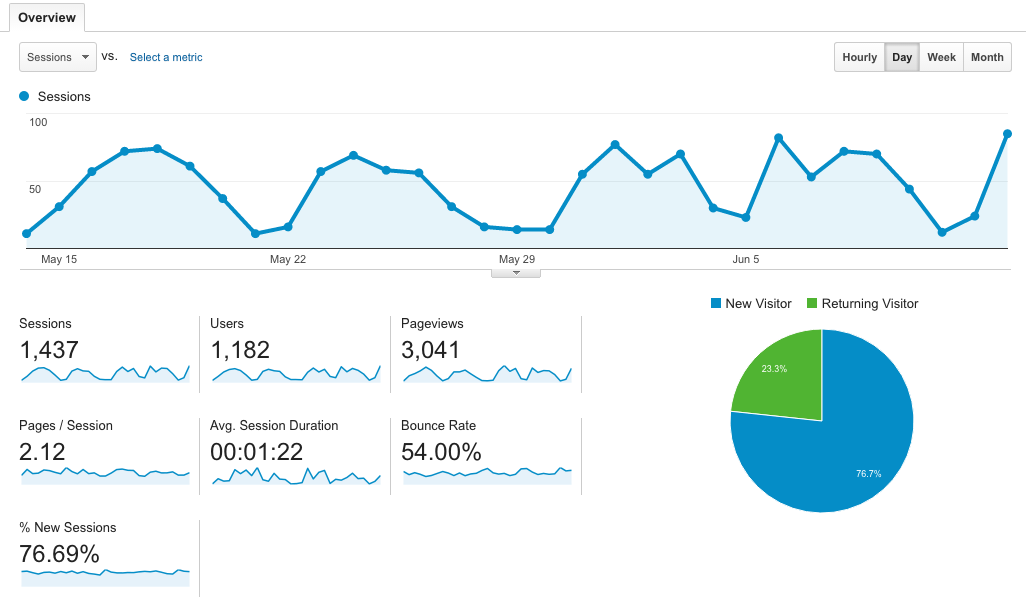
On the left side of the screen, there is a list of tabs. Simply click ‘Audience’ and then ‘Overview’. This section is responsible for relaying how many people are visiting your site and how long they’re staying. You should see something similar to the picture above

Decoding Google Analytics on Your Own: Part 1

So, what does all of this information mean? Here’s a quick breakdown:

Sessions:

Sessions simply means a period of time a user spent on your page. If I visit your page, my time on your website would be counted as 1 session. Google’s tracker resets a session after 30 minutes of inactivity. So, I can visit your page 5 different times in one day and account for 5 sessions.

Users:

You may be curious why the number of users is lower than the number of sessions. Users are only counted once—even if they visit your page numerous times on different days and account for multiple sessions. So, 1 user can give you 20 sessions.

Pageviews:

Most websites have more than a single page. So, if I visit your website and click your homepage, then your about us page, then your contact page, that would count as 3 page views. Just as a sum up—I would be counted as 1 user, 1 session, and 3 page views for this visit. It’s making sense, right?

Pages/Sessions:

This one is super simple. This is the average number of pages a user viewed per session on your website. According to the image above, users typically visited 2.12 pages while on their website.

Avg. Session Duration:

Again, super straight forward. The average time users spent on their website was 1 minute and 22 seconds.

Bounce Rate:

A bounce rate is the percent of users that only visited one page on your website and didn’t interact with anything. So, if I visited your website and immediately left without clicking another page, that would be considered a bounce.

% of New Sessions:

This is the estimated percentage of new users on your website. Pretty straight forward.

Decoding Google Analytics on Your Own: Part 1

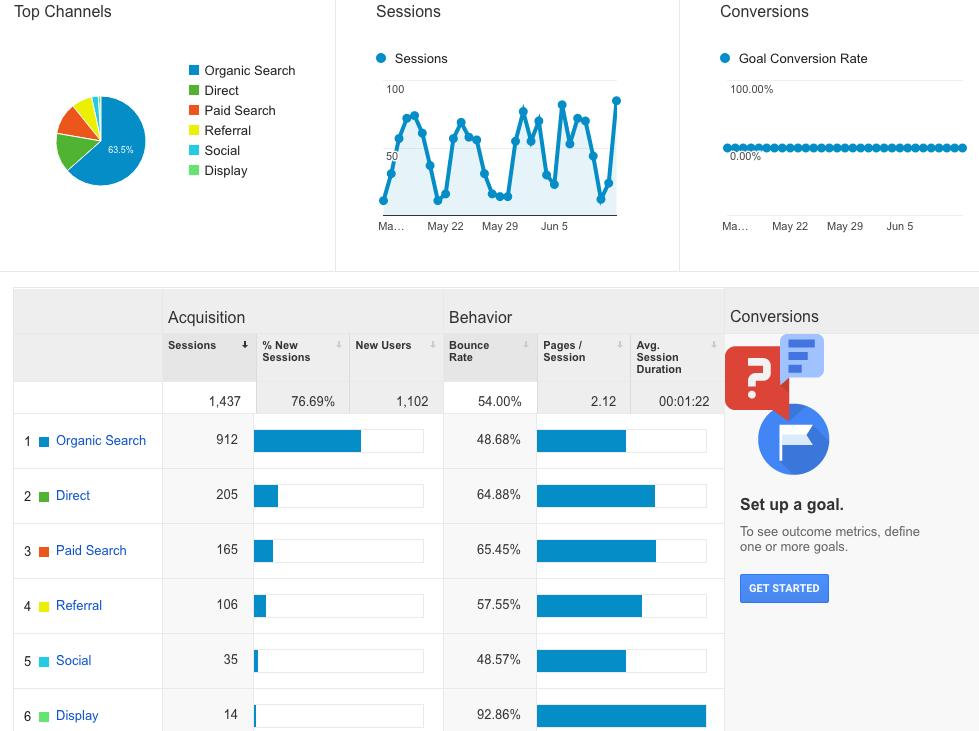
Moving along, on the left side of the page click ‘Acquisition’ and then ‘Overview’. This section allows you to determine how people are getting to your website. You should see something similar to the image below.

Decoding Google Analytics on Your Own: Part 1

Organic Search:

This is the number of times someone found your page from searching relevant terms online. For example, if I googled ‘summer clothes’ and I clicked Forever21’s website from the results page, that would count as an organic search.

Direct:

Super simple, this is the number of times someone typed in your url and went directly to your page.

Paid Search:

This is the number of times a user clicked your website url from one of your paid efforts. For example, if you had a paid google ad and someone clicked it—that would count under paid search.

Referral:

This is the number of times a user clicked a link to your website from another source. For example, if I was reading a blog about summer clothes on a fashion blogger’s page and clicked a link to Forever21 within the blog—that would count as a referral.

Social:

This is the number of times someone went to your website from social media. For example, if someone clicked your website link from a post on your Facebook—that would count as a social media point.

Take it step by step when deciphering your Google Analytics in order to avoid overwhelming yourself. This online analytics tool has endless data that you can discover, but as for now you’re on your way to decoding the beginning steps of your Google Analytics. It’s important to understand how many people are visiting your site, how long they’re staying, and where they’re coming from. Use this new information to alter your marketing strategy accordingly!

How to Run Your Healthcare Practice's Pinterest Account!

How to Run Your Healthcare Practice's Pinterest Account

According to VB, there are over 100 million users on Pinterest. That is a huge pool of potential customers that you’re missing out on if your business isn’t active on this platform. You may have heard numerous people say they have a board for their future wedding, house inspiration, DIY crafts, etc. So, what does this have to do with healthcare? Trust us, there’s endless potential for your healthcare practice on Pinterest and we’re here to show you the light. If your healthcare practice has a Pinterest, but doesn’t know how to start using it, then you’re in luck. Here’s 4 steps to take after you’ve created a Pinterest for your healthcare practice.

1. Increase brand awareness.

Pinterest allows each user to customize their own page, which your practice can capitalize on. You can add your business name, logo, description explaining your services, and links to your other social media platforms. Your boards should be healthcare related, so any user browsing through your pins will be there because they are researching healthcare related information. This is the perfect time to capitalize on increasing your brand awareness and make sure potential customers know who you are. While this platform is used leisurely by users, that doesn’t mean you can’t snag new patients.

2. Gain a healthcare following.

This is key. You want to follow and pin items from users that are healthcare related. Whether they simply have a board about healthier living, healthcare trivia, etc., target these people. This enhances your likelihood of them following your account back. For example, if a pool company followed your account, would you be likely to follow to them back? Of course not, you’re running a healthcare practice. It’s important to create a target audience and find people that fit the bill. Don’t waste your efforts following people that most likely will ignore your follow. You need to show them that your account falls within their interests!

3. Create boards that users will want to follow.

While it’s important to have a board for your business and pinning relevant articles, your services, etc., don’t focus primarily on yourself. You just need to be a resource for your followers. Get creative and come up with boards that are fun, interesting, and engaging for your followers. Here’s a few examples to get your mind going: “Fitness Routines”, “Healthy Bones” “Parents Guide: Keeping Your Kid Healthy” “Healthcare Trivia” “Healthcare Memes”. Depending on your practice, you can target your boards a little further. Just make sure it’s fun and something that people would want to follow.

4. Boost engagement through contests.

What’s the point of having a Pinterest if no one is engaging with your pins? Pinterest is the perfect place to host a photo contest considering it’s a platform full of photos. You can decide how you want to run your photo contest, (Example: most creative photo with our business logo on it will win X prize) but just make sure you have enough of a following to run this contest. Encourage your patients in person to participate and get the ball rolling if organically growing your followers hasn't panned out in a big way yet. By boosting engagement, your page will see an increase in activity and followers which means a higher chance of potential patients.

Pinterest has endless potential for your healthcare practice, but make sure you’re starting with the basics and don’t get too far ahead of yourself. Following these first steps will make sure your account is in tip-top shape. Every business needs a hearty following, active engagement from followers, and great content. Start with the basics and see how far you’ll go!

6 Ways to Target Patients Using Social Media Marketing

Patients have become much more active on social media, using the different platforms to research care providers, ask questions and share their experiences. With patients taking to their smart phones to provide feedback and search for providers on the go it only makes sense for imaging centers, hospitals and doctor’s offices to have a social media marketing strategy in place.

We're excited to see more and more radiologists and other health care providers recognizing the value of social media in health care; because that has been a big hurdle to overcome. The International Society for Computed Tomography for instance, will be hosting a talk by Jenny K Hoang, MD about the importance of radiologists utilizing Twitter at their upcoming CT symposium in San Francisco.

Untitled design (10).jpg

Today we’ll explore the six ways healthcare marketers can use social media to target specific groups of patients, this way their content marketing and messaging will be built specifically for different kinds of patients.

6 Tips for Targeting Patients Using Social Media Advertising:

1.     Use Facebook advertising to share a recent blog post with a specific kind of audience. Ex: Boost your post about the difference between screening mammograms and diagnostic mammograms so it is shown to women, aged 55+ who are located within a 10-mile radius of your imaging center.

2.     If you have a list of your patients’ email addresses, you can create a look-alike list from those addresses and launch a Facebook ad campaign.

3.     New to Twitter and hoping to build your following and improve your brand recognition? Create a campaign for gaining followers. You can select your audience based on one or multiple locations, filtering by other accounts they follow, interests, behaviors event event targeting.

4.     You can also create an audience to target on Twitter based on only people who have visited your website. Just put a snippet of code on your website to collect the visitors’ info and the ad you create will show to only those users on Twitter.

5.     You can limit audiences on Twitter based on their regular behavior as well. For instance, you can limit your ad so it will OR won’t show to a group of users who are “likely to have health insurance from Aetna” which has a potential audience of up to 1.82M users.

6.     LinkedIn is the best social media platform for industry experts. This article is supposed to be about using social media to target patients, but as a provider it’s also important to provide content for others in your industry. (ex: Referring Physicians or Community Organizations) These kinds of targets are regularly being active on LinkedIn where you can pay to sponsor posts and make it so that only users with certain job titles or employees of certain businesses see the ads.

Read More: 8 Healthcare Digital Marketing Tips >


If you're interested in an evaluation of your organization's current social media practices, fill out the form below and we'd be glad to perform a free evaluation for you. 

Using Social Media To Target Women With Your Healthcare Marketing

using social media to target women with your healthcare marketing

Women are notoriously known as the healthcare decision-makers in their families, so it makes sense that they should be at the forefront of healthcare marketer's strategies.  Social media is a great way to engage with patients and their families, and women absolutely dominate that marketing field.  They are significantly more engaged on Facebook, Instagram, Twitter and Pinterest than men, while men lead the LinkedIn and YouTube user-base.  

Healthcare Communication News noted that women have 55% more posts on their walls than men and 8% more friends.  Additionally, each month there are 40 million more females utilizing Twitter than males.  Women also have an average of 140 more posts on Facebook than men.

In our experience, we’ve found that women are more apt to follow a local business and provide reviews online based on their experiences. Usually people only provide reviews if they have had a fantastic experience or terrible one, which is why promoting positive engagement on your social media pages is so important. By using Twitter and Facebook to reach out to female patients and potential patients, you have the opportunity to communicate directly with those with that wield the decision-making power in their families.

Since word-of-mouth has long been considered an influential referral stream in healthcare, healthcare marketers need to find a way to build buzz about their organization amongst their community. Social media is this generation’s hub for gathering recommendations, opinions and factoids about businesses, movies, music and yes, even healthcare providers.

The first step to successful marketing is knowing where your patients are, and the next most important step is getting in front of them.  By using the data from this infographic, you can more appropriately target the women in your community on social media.